  |
|
11.16.26

The Clippy Lesson Every AI Team Is About to Relearn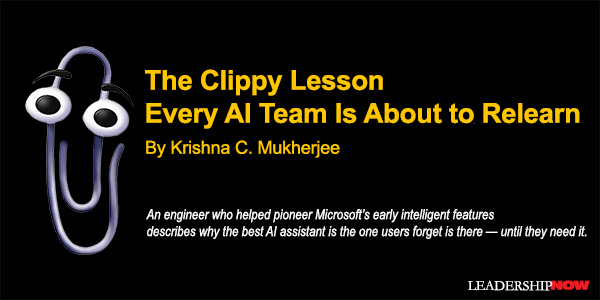
EVERY few weeks, I see a demo of a new AI assistant that watches what you are doing, anticipates what you need, and offers to help before you ask. The audience applauds. The founders beam. And I feel a familiar sensation because I’ve seen this movie before. I was at Microsoft when we made proactive assistance a centerpiece of Office, and I watched one of the most technically ambitious features of its era become a global punchline. I’m talking, of course, about Clippy. The Office Assistant wasn’t a lazy idea. It was built on rigorous research into Bayesian inference and user modeling, and it represented a sincere attempt to answer a real question: millions of people were using powerful software while tapping only a fraction of its capabilities. What if the software could notice what you were trying to do and offer to help? A quarter century later, that’s precisely the promise of every AI copilot, agent, and assistant now being funded, built, and shipped. Which is why the reasons Clippy failed deserve close study — because they were never really about a cartoon paperclip, and they haven’t gone away. The Failure Was Behavioral, Not Technical The convenient story is that Clippy failed because the technology was primitive. That story lets today’s teams off the hook: our models are vastly better, so surely the outcome will be different. Having worked on the intelligent features of that era — the ones that survived, like AutoCorrect and AutoFormat, and the ones that didn’t — I can tell you the convenient story is wrong. Clippy didn’t fail because it was dumb. It failed because of its behavior. It presumed to know your intent. Type the word “Dear” and it concluded you were writing a letter, whether you were or not. It insisted on being noticed — animated, front and center, tapping on your screen’s glass. And it was hard to dismiss. Turning it off felt like a negotiation. Each of these choices, individually defensible in a design review, combined into something users experienced as an uninvited guest who kept guessing wrong about why you’d come to the party. Meanwhile, AutoCorrect quietly became one of the most widely used intelligent features in software history. It made billions of corrections without a mascot, without an announcement, without demanding credit. The contrast is the whole lesson: the assistance that endured was the assistance you forgot was there — until the moment it helped you. Power Without Calibration Is a Liability Here’s the uncomfortable part for today’s AI teams: modern systems are far more capable than anything we could have built then, and that makes the behavioral problem worse, not better. A weak assistant that interrupts you is an annoyance. A powerful assistant that interrupts you is a threat to your sense of control over your own work. It may rewrite your paragraph unprompted, insert itself into your meeting notes, confidently answer a question you didn’t ask, or, in agentic form, take an action you didn’t approve. Capability raises the stakes of every wrong guess. And large language models add a failure mode Clippy never had: they can be wrong while sounding completely certain. Clippy at least looked like a cartoon. Today’s assistants speak in the polished prose of an expert, whether or not an expert is home. Users respond to overreach the same way they always have. They disable the feature. They ignore it. Or they quietly resent the product that contains it. In enterprise settings, I’ve watched this play out at scale: an AI capability gets switched off across an entire organization not because it lacked power, but because it lacked manners. Adoption dies not in the benchmark but in the thousandth small interruption. I learned how decisive that off switch could be long before the current AI wave. In the late 1990s, I invented the Intelligent Filing Manager (INTELLIFM) — an AI expert system that automates multijurisdictional filings and remains in production use today. I initially delivered its AI functionality through an ActiveX component that users downloaded and ran in their web browsers. The technology worked, but some firms temporarily blocked the component for security reasons. They weren’t yet comfortable allowing an intelligent component to operate within their environments. Use resumed only after I explained exactly what the component did and how it could be downloaded and operated safely. The capability never changed. What changed was trust. Organizations don’t retain technology they can’t trust, and trust is built through transparency and control. Capability alone has never been enough. We’re seeing this exact script play out today. When Microsoft rolled out aggressive background capabilities like Windows Recall, the immediate user and security backlash over uninvited background watching forced a rapid shift from default-on to strict opt-in. Elsewhere, enterprise IT administrators actively deploy Group Policy settings to strip AI features from system taskbars or require explicit toggles to disable automated meeting observers in software like Teams. The tools are being switched off not because they lack raw intelligence, but because they lack boundary awareness. The conclusion I reached decades ago still holds, and it’s uncomfortable for an industry that loves visible magic: successful assistance is invisible until needed. Failed assistance barges in. How To Build AI Assistance Users Actually Keep On The good news is that this is a solvable design problem. The principles that separated AutoCorrect from Clippy translate directly to the AI systems being built today and include: 1. Earn trust through restraint. Surface help in response to a real signal, not a guess about what someone is doing. A user pausing on an error, invoking a command, or explicitly asking a question is a signal. A user typing the word “Dear” is a guess. Every time an assistant intervenes correctly, it earns a small deposit of trust; every wrong guess makes a large withdrawal. Design your triggers as if trust were the scarcest resource in your product — because it is. 2. Make dismissing or overriding the assistant effortless. One click, one keystroke, one clearly honored “no.” If declining help takes more effort than accepting it, you’ve built a trap, not a feature, and friction breeds resentment faster than any wrong answer. Just as important: remember the dismissal. An assistant that reoffers the same rejected help teaches users that their preferences don’t matter. 3. Calibrate confidence. Don’t let the system sound certain when it isn’t. Modern models can express uncertainty, cite their sources, and distinguish between “here is the answer” and “here is my best guess — please verify.” Teams often suppress this because hedged answers demo poorly. Ship the hedge anyway. A system that admits uncertainty at the right moments is trusted when it speaks with confidence. 4. Respect attention and timing. The right help at the wrong moment is still an interruption. A suggestion that arrives mid-thought costs more than it delivers, no matter how good it is. Prefer ambient availability over active intrusion: put help where the user’s eyes will land when they want it, not in front of what they’re doing now. None of this limits ambition. It channels it. The teams that internalize these principles will build assistants that people keep enabled, rely on daily, and eventually stop noticing — which, counterintuitively, is the highest compliment intelligent software can earn. We learned this lesson once, expensively and in public. The technology has changed beyond recognition since then. Human beings have not. The AI teams that remember the paperclip will build the assistants that last. The ones that forget it are about to relearn the lesson on a much larger scale.    Follow us on Instagram and X for additional leadership and personal development ideas. 
Posted by Michael McKinney at 10:08 AM
|
 |
BUILD YOUR KNOWLEDGE



How to Do Your Start-Up Right STRAIGHT TALK FOR START-UPS 

Grow Your Leadership Skills NEW AND UPCOMING LEADERSHIP BOOKS 
Leadership Minute BITE-SIZE CONCEPTS YOU CAN CHEW ON 
Classic Leadership Books BOOKS TO READ BEFORE YOU LEAD |
|

ABOUT
FOLLOW US:
     

Recent Posts
Categories
Full site feed
|
 |
| ||
 | Follow us on:
© 2025 LeadershipNow™  |
| |